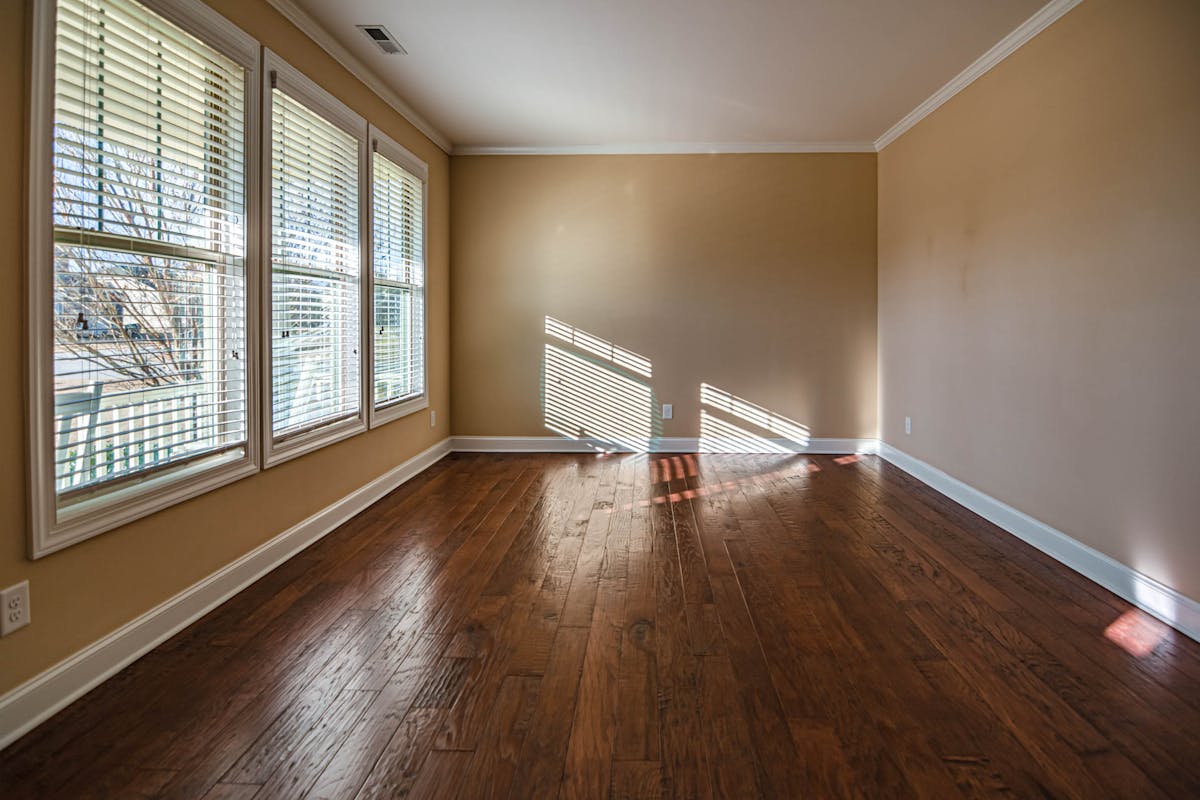
Furnish an empty room
in 30 seconds with AI.

Photo: Pixabay · Pexels
Article contents↓
- The problem: an empty room loses 30% of its appeal
- Virtual vs physical staging: the cost disruption
- Measurable results: +25% sale speed
- Gemini Nano Banana tutorial, step by step
- Adobe Firefly tutorial, the photorealistic option
- DALL-E 3 tutorial, via ChatGPT
- Quick comparison of the three tools
- Required disclosure, non-negotiable
- Complete workflow, from empty photo to listing
- To go further, from photo to immersive video
- Common mistakes that ruin a staged photo
An empty room turns buyers off. But furnishing it virtually in 30 seconds? It’s possible. Cost: free to $60 per property. Result: +25% sale speed and +49% inquiries. Here are the leading AI tools (Gemini Nano Banana, Adobe Firefly, DALL-E 3), the complete workflow, and the required US disclosure.
The problem: an empty room loses 30% of its appeal#
A brutal fact: a property with visual quality sells 25% faster on average. For a buyer, “quality” doesn’t mean a $5,000 physical staging with decorators and rented furniture. It means a photo that shows the room’s potential.
That’s exactly the snag. You have an empty bedroom, a furniture-less living room, a basic kitchen. In the photo, it looks “lifeless.” The buyer doesn’t project themselves. Consequences:
- Fewer listing clicks
- Fewer showings requested
- More price negotiation (“empty room = renovation expected”)
For overall visual quality before even staging, see our method to improve your photos with AI: brightness, color balance, uniform sky. That’s the prerequisite.
Now imagine the same room with a bed, a dresser, some decor. Suddenly, the buyer sees where their sofa goes, they project living there. That’s the goal of AI virtual staging.
Virtual vs physical staging: the cost disruption#
Classic physical staging is:
- Rent furniture: $400-$1,200 for a home
- Bring in decorators: 1-2 days of work
- Photograph the staged property
- Remove furniture after the sale
Total cost: $5,000 to $15,000 per property. Viable for an $800K home, completely out of reach for a $250K studio.
AI virtual staging is:
- Upload an empty-room photo
- AI generates multiple furnished versions (bed, sofa, minimalist or warm decor)
- Download the enhanced image
- Publish with “virtually staged” disclosure
Cost: free to $60 per property. Time: 2-3 minutes per room.
Measurable results: +25% sale speed#

Photo: Vecislavas Popa · Pexels
Properties shown with quality visuals (physical staging, video, AI) sell 25% faster. On a $750K home:
- Without staging: 90 days on average
- With AI staging: 67 days
23 days saved—a commission cashed three weeks earlier, and a listing freed for the next. On inquiries, listings with enriched visuals (staging + video) receive +49% more contacts. More contacts + faster sale = more properties sold with the same prospecting effort.
Gemini Nano Banana tutorial, step by step#
Gemini Nano Banana is Google’s AI image model, free in the Gemini app, that lets you virtually furnish any empty room in seconds via a simple prompt.
Step 1: upload your photo#
- Download the Gemini app (iOS / Android) or go to gemini.google.com
- Click “Create a staging”
- Upload your empty-room photo (JPG or PNG, 1 MB minimum)
Step 2: choose a furnishing style#
- Minimalist: clean furniture, white/gray, zen mood
- Warm: wood, warm colors, cozy
- Modern: clean design, gray/black, very current
- Boho: colors, plants, boho-chic
- Classic: timeless style
Tip: generate 3 versions of the same room, in different styles. Not all buyers share the same taste, and these variants also serve you on social media.
Step 3: adjust the settings#
- Furnishing budget: economy, standard, premium (Gemini adjusts furniture quality through your prompt)
- Light direction: natural lighting improvement
- Background blur: useful if the back wall is ugly
Step 4: generate and download#
Click “Generate.” AI takes 30-60 seconds. You get the retouched photo back in high resolution.
Step 5: publish with required disclosure#
On Zillow or Realtor.com, place the Gemini Nano Banana photo next to the real photo, and add a caption: “Virtually staged. Computer-generated image.”. Transparent, legal, and the buyer sees the potential without being misled.
Adobe Firefly tutorial, the photorealistic option#
Adobe Firefly is more powerful than Gemini Nano Banana on photorealistic precision. Ideal for premium brokerages that already have the Adobe suite.
Advantages#
- Fine furniture control: “light wood bed, gray pillow, no headboard”
- Photo generation, not simple retouch: AI really reinvents the room
- Multiple styles in parallel: 5 versions generated at once
- High-res export: print possible, easy later retouching
Pricing#
- Free: 1 generation per month (for testing)
- Pro: ~$18/month for 15 generations per month (per room, not per home)
- Brokerage: ~$60/month for unlimited generations
For a small brokerage (under 20 properties a month), the Pro plan is more than enough.
DALL-E 3 tutorial, via ChatGPT#
If you already have ChatGPT Plus, DALL-E 3 is the logical choice: integrated into ChatGPT, natural conversation to adjust renders. Limits: you have to clearly describe the expected render, standard resolution, 30-60 second generation time. Perfect if you already use ChatGPT daily.
Quick comparison of the three tools#
| Criterion | Gemini Nano Banana | Adobe Firefly | DALL-E 3 |
|---|---|---|---|
| Output quality | ★★★★ | ★★★★★ | ★★★ |
| Style variety | Excellent | Excellent | Basic |
| Price | Free to ~$12/img | $18-$60/month | Free trial |
| Generation time | 30-60 sec | 1-2 min | 2-3 min |
| Customization | Limited | Very deep | Minimal |
| For whom | Generalist brokerages | Premium brokerages | Beginners, tests |
Recommendation:
- You’re starting: Gemini Nano Banana, free in the Gemini app
- 10+ properties per month: Adobe Firefly, best quality/price ratio
- High-end target: Midjourney, premium results for premium clients
Required disclosure, non-negotiable#
In the US, NAR’s Code of Ethics and most state regulations require you to disclose that the photo is virtually staged. Not optional. Three possible placements:
- Below the photo: “Virtually staged”
- At the bottom of the listing: “Photos include virtually staged images”
- Ideally, both
If you don’t disclose: risk of buyer complaint, loss of trust, reputation drop. AI does beautiful work, but transparency is non-negotiable.
AI furnishes the room. The “virtually staged” disclosure keeps trust. Both go hand in hand.
Complete workflow, from empty photo to listing#

Photo: Max Vakhtbovycn · Pexels
Day 1: tour and photos#
Photograph each empty room. Staging priorities:
- Bedrooms: show where the bed goes
- Living room: that’s where the buyer projects themselves
- Kitchen: less priority, often visible “as is”
- Office or secondary room: optional
Day 2: AI staging (30 minutes)#
- Upload the key photos to Gemini Nano Banana or Adobe Firefly
- Generate 2-3 versions per room, different styles
- Download the best images
- Integrate AI photos and real photos in your listing
Day 3: publication#
Publish on Zillow / Realtor.com with a mix of real photo + AI photo, “virtually staged” disclosure on each. Average result: +49% more inquiries on this listing.
Total time: 30 minutes of AI staging for a whole home. Cost: $0 to $60. Gain: 25% sale speed. The ROI is even sharper because the commission lands several weeks earlier.
To go further, from photo to immersive video#
You’ve got AI-staged photos. The next step: turning these images into a real estate video. That’s exactly Kappn’s promise: start from your photos (AI-staged or real) and generate a complete immersive video, with motion, narration, music. Video ready for Reels, TikTok, portals—no editing required.
For the complete picture of AI in the real estate transaction (from photo to closing), see our pillar guide on AI in the real estate transaction. And to push the render toward cinematic (drone, color grade, scripted narration), see cinematic real estate video.
The winning combo: Gemini Nano Banana or Adobe Firefly for staged photos + Kappn for video. Complete home presentation in 1 hour of work, $5-$120 total cost. And a property that sells 25% faster, on average.
Common mistakes that ruin a staged photo#
Virtual staging is a multiplier when it works and a liability when it doesn’t. The difference between a photo that pulls buyers in and one that flags as “fake” comes down to a handful of execution mistakes that most agents never even realize they’re making. After reviewing thousands of staged listings on Zillow and Realtor.com, three categories of error account for 90% of bad outputs. Avoiding them is not a matter of better tools — it’s a matter of better instructions.
The first category is furniture proportion errors. The AI doesn’t always know the actual size of the room, so a generated sofa can end up too large, blocking circulation paths, or too small, making the room look cavernous. The fix is to include scale references in your prompt: mention the approximate square footage, point out the door and window positions, and request furniture sized for “a typical 14×16 foot living room.” The model adjusts its output accordingly, and the result reads as natural rather than cartoonish.
The second category is style mismatch with the property. Generating a hyper-modern Scandinavian living room in a 1920s Victorian creates dissonance that buyers detect instantly, even if they can’t articulate why. The right approach is to match the staging style to the architectural period and the target buyer demographic. A craftsman bungalow in Portland and a high-rise condo in Miami need radically different staging vocabularies, and the prompt should specify both the architectural context and the buyer profile to align.
The third category is over-staging. Adding eight pieces of furniture, two rugs, three plants, four pieces of art and an accent chair turns the photo into a furniture catalog rather than a home. Buyers want to project their own life into a space, not feel like they’re walking into a showroom. The rule of thumb that works in 95% of cases: stage with three pieces of furniture maximum, one rug, one plant, one piece of art per room. The result reads as a real home — the only outcome that converts to showings.
Questions we get asked.
How much does AI virtual staging cost?
Free with Gemini Nano Banana (unlimited in the Gemini app) to $60/property with Adobe Firefly (subscription from $5/month). That’s 10-20x cheaper than physical staging ($300-$700 per room) and 30x faster: 30 seconds per room versus half a day.
Is AI virtual staging legal in the US?
Yes, with conditions. NAR’s Code of Ethics Article 12 requires “true picture” representation. You must: (1) caption photos with “Virtually staged” or “Computer-generated image”, (2) display the empty photo alongside, (3) never add fixed features that don’t exist (fireplace, balcony, addition).
Which AI tool for virtual staging in 2026?
Three tools depending on your need: Gemini Nano Banana (free, mobile, beginners), Adobe Firefly ($5/month, premium photorealism), DALL-E 3 (included in ChatGPT Plus, prompt flexibility). Gemini fits 90% of listings, Firefly suits luxury, DALL-E for agents wanting to test multiple moods.
How long does it take to virtually stage an empty room?
30 seconds to 1 minute per room with Gemini Nano Banana. For a 4-room apartment: 4 minutes of generation, 10 minutes of precise prompts. Total staging workflow: 15 minutes per listing. Agents who apply this protocol report +25% sale speed on empty properties.
Have something to say?No comments yet
Share your take, ask a question, or tell us about your brokerage experience. Moderation is fast.
Leave a Reply